들어가며
이전 포스트에선 단일 프로젝트 내에서 모듈(module)을 작성하고 import 하는 방법에 대해 알아 보았다. 이번 포스트에서는 공유 라이브러리(dll 또는 static library)에서 모듈을 export/import 하는 방법에 대해 알아 보는 시간을 가지도록 한다.
DLL에서 모듈 작성
기본적인 DLL 모듈 작성은 [여기]에서 확인하도록 한다. 이번 섹션에서는 dll에 C++20 모듈을 작성하고 export 하는 방법에 대해 알아 본다.
dll 프로젝트를 생성하고 다음과 같이
1. 먼저 .ixx 모듈 파일에서 함수를 선언해 줄 때 export 키워드 뿐만 아니라 dll export 문도 같이 적어 준다.
- 모듈 인터페이스(.ixx)는 선언과 시그니처만 노출합니다.
- export void greet(); 와 같이 함수 선언부는 인터페이스에 들어가지만, 정의는 .cpp 구현부에 있습니다.
- 따라서 .ifc 파일을 참조하는 것만으로는 심볼을 제공할 수 없습니다. (이건 헤더와 비슷하게 선언만 알려주는 역할)
- DLL에서 함수 심볼을 내보내야(import 대상이 링킹할 수 있도록) 하는데, 일반 모듈 함수는 자동으로 __declspec(dllexport) 되지 않습니다.
- 전통적인 헤더/소스와 마찬가지로, 모듈 기반 프로젝트도 내보낼 API에는 __declspec(dllexport) 또는 __declspec(dllimport) 같은 지시자를 붙여야 합니다.
- 그래서 단순히 함수 앞에 export 키워드만 붙이는 것이 아닌, 아래와 같이 __declspec(dllexport) 지시자를 추가한다.
// DynamicLibraryModule.ixx

export module DynamicLibraryModule;

namespace DynamicLibrary
{
    export __declspec(dllexport) void greet();
}
// DynamicLibraryModule.cpp
module;
#include <iostream>
module DynamicLibraryModule;
namespace DynamicLibrary
{
void greet()
{
std::cout << "Greetings from DynamicLibrary Module!" << std::endl;
}
}dllexport 지시자가 누락 된 경우 빌드 타임에 아래와 같은 에러가 발생한다.
unresolved external symbol "void __cdecl DynamicLibrary::greet(void)" (?greet@DynamicLibrary@@YAXXZ::<!DynamicLibraryModule>) referenced in function main
모듈 import
import DynamicLibraryModule;

#pragma comment(lib, "../x64/Debug/DynamicLibrary.lib")

int main()
{
    DynamicLibrary::greet();
    return 0;
}
dll 프로젝트에서 export하는 DynamicLibraryModule을 impor하려고 하면 다음과 같은 에러를 만날 수 있다.
could not find module ' DynamicLibraryModule '
' DynamicLibraryModule ': is not a class or namespace name
'greet': identifier not found
이는 이전 C++에서 헤더파일을 못 찾는 것 처럼, 다른 프로젝트에서 export하고 있는 모듈을 찾지 못하고 있는 것이다.
2. DLL 빌드가 완료 되면 xxx.modules.ifc 파일을 찾는다(기본적으로 이 파일은 프로젝트 obj 파일들과 같은 위치에 생성 된다)
3. exe 프로젝트에서 xxx.modules.ifc 파일을 참조 할 수 있도록 프로젝트 프로퍼티에 다음과 같이 적어 준다.
Add /reference "path to DLL project\x64\Debug\xxx.modules.ifc"
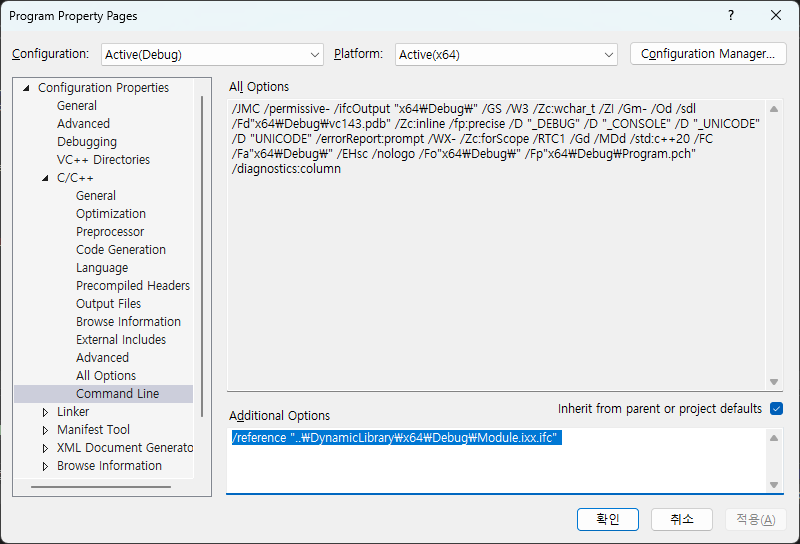
그랬더니 이번에는
unresolved external symbol "void __cdecl DynamicLibrary::greet(void)" (?greet@DynamicLibrary@@YAXXZ::<!DynamicLibraryModule>) referenced in function main
에러를 만날 수 있다. dll 프로젝트에서 생성한 static lib를 링킹하지 않아서 그렇다.
// import module from another project
프로젝트 참조 걸어야 됨
https://learn.microsoft.com/en-us/visualstudio/ide/managing-references-in-a-project?view=vs-2022
프로젝트 우클릭 -> Add -> Reference -> 모듈 프로젝트 선택
경로가 다르지만 같은 이름을 가지고 있는 파일들을 사용할 때,
파일 이름이 같은데 모듈을 뽑아 내면 모듈 디펜던시 파일을 덮어 써서 json 포멧이 깨진다.
그래서 아래와 같은 에러 뿜뿜.
Cannot read Module Dependencies file x64\Debug\Transaction.cpp.module.json: Index was outside the bounds of the array. The build order might be incorrect.
파일 이름이 같더라도 경로가 다르면 다른 위치에 각각 ifc파일과 module.json 파일을 만드는 방법이 무엇인지 알아낼 필요가 있다.
ModuleOutputFile, ModuleDependenciesFile
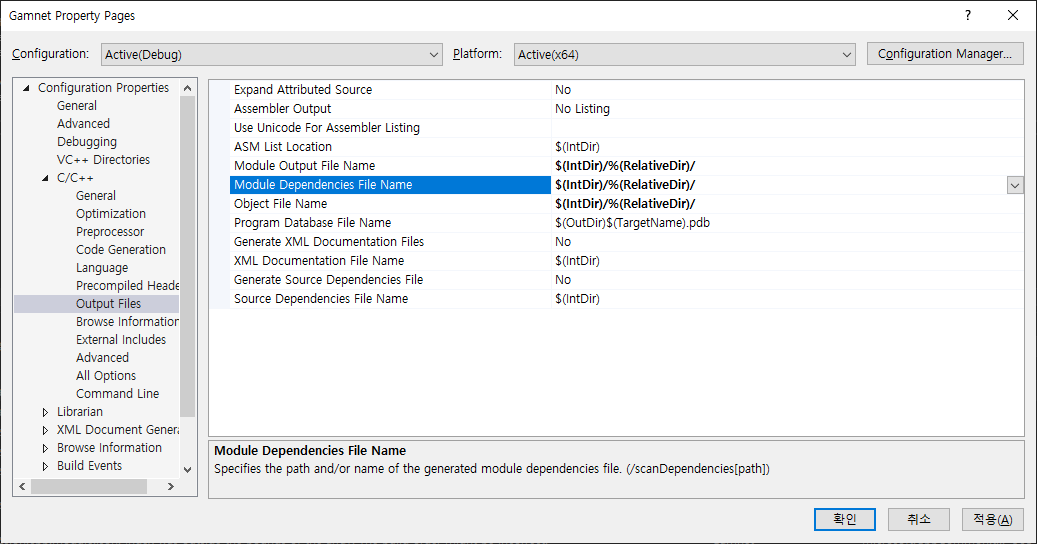
위 처럼 output file 위치를 다르게 해줬는데도 계속 could not find module이라고 한다?
해결 :
C1214 Modules conflict with non-standard behavior requested via '/Zc:twoPhase-'
Possible incompatible environment while importing module 'Gamnet.Singleton': _GUARDOVERFLOW_CRT_ALLOCATORS=1 is defined in current command line and not in module command line